
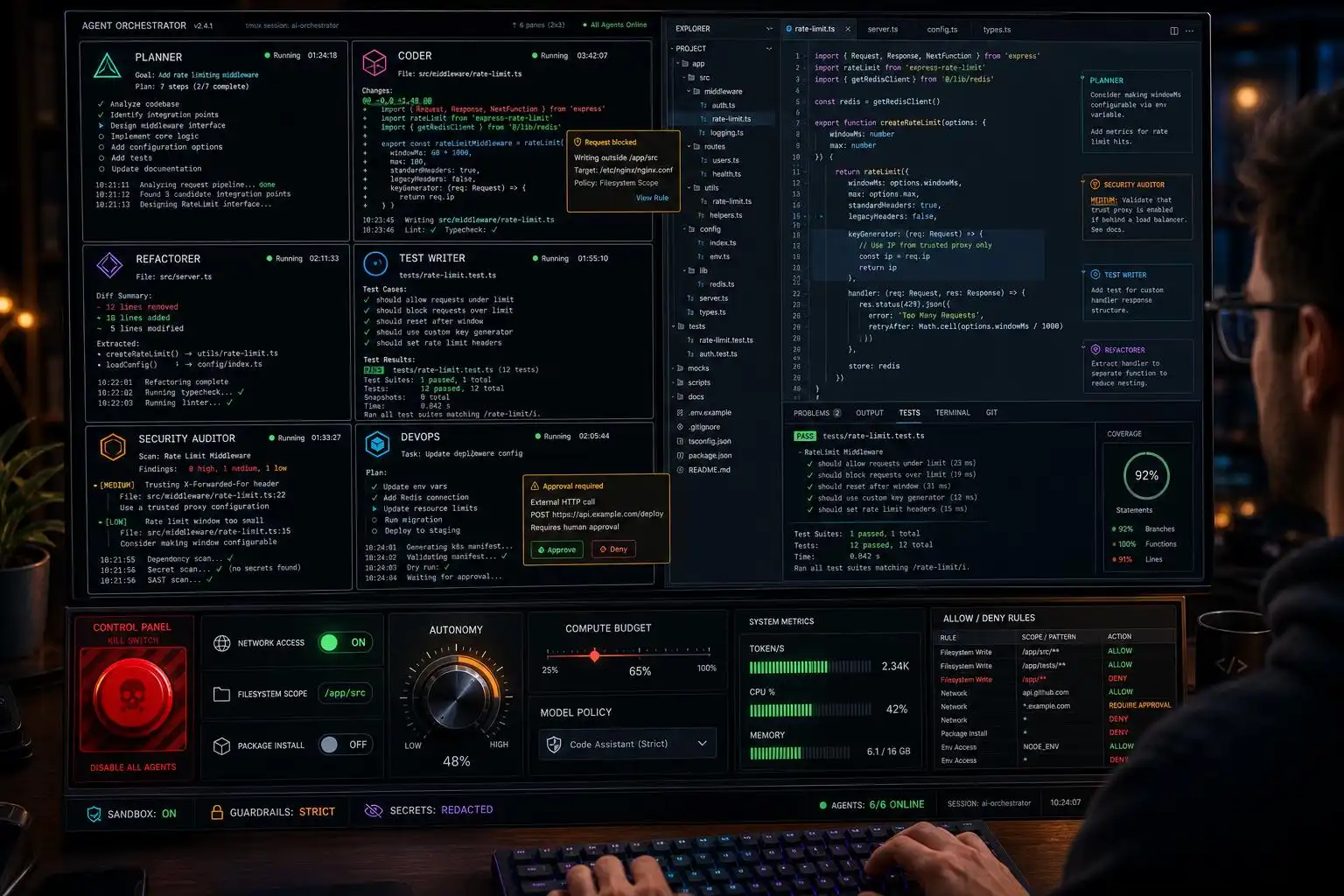

The biggest change in 2026 isn’t better autocompletion — it’s that coding agents now read repos, plan changes, edit multiple files, run commands, and even open PRs. The unit of trust moved from “do I accept this line?” to “do I trust this agent’s understanding of my system?” Choose badly and you’re importing workflow debt as surely as picking the wrong framework a decade ago.[1]
The 2026 landscape, at a glance
If you map agents to the control you want, the picture clarifies:
- Cursor is the polished AI‑native IDE for devs who want acceleration inside the editor; Claude Code is the terminal reasoning engine for hard problems; GitHub Copilot is the enterprise‑safe default for teams already living in GitHub. Magic Coder (BridgeApp) emphasizes workspace context and standards; Cline offers open‑source transparency and approval gates; Windsurf aims for predictable editor‑side help; Devin pushes toward bounded autonomous cloud work.[1]
- Enterprise buyers now evaluate “agents” — not just assistants — because teams can offload dynamic, multi‑step tasks with tool use. Top‑trending platforms include Kiro, Amazon Q Developer, Claude Code, GitHub Copilot, Gemini Code Assist, Codex, GitLab Duo Agent Platform, and Cursor; Gartner’s category definition explicitly contrasts agents with traditional code assistants.[3]
- Copilot leans into model breadth and GitHub‑native wiring (PRs, issues, Actions), and its Code Review now runs on an agentic planning loop over the diff. Gemini Code Assist leans on a million‑token context window and Google Cloud’s identity/security stack.[4]
A decision framework you can actually use
Start by turning the control dial — how much autonomy are you comfortable delegating for this task?
- In‑editor acceleration (tight control): Cursor or Copilot chat/completions. Cursor if you want an AI‑native IDE; Copilot if your team’s PRs, issues, and Actions are the center of gravity.[1][4]
- Terminal‑first reasoning on gnarly refactors: Claude Code (repo‑wide edits with a strong chain‑of‑thought loop, run/test/interpret cycles).[1]
- Long‑context audits and migration planning: Gemini Code Assist for the context window plus GCP identity guardrails; pair with PR review in Copilot if you’re GitHub‑centric.[4]
- Policy/standardization at org scale: Magic Coder by BridgeApp for architecture‑aware, workspace‑contexted automation; Cline if you want open‑source transparency with explicit approval gates.[1]
- Bounded autonomy for well‑specified tickets: Devin in a cloud worker mode, with clear task fences and human review on merge.[1]
Under enterprise constraints, verify that your shortlist overlaps with what your security org already trusts; the current buyer signal includes Claude Code, Copilot, Gemini Code Assist, Cursor, and others in the “top trending” cohort.[3]
Glue that makes multi‑agent workflows livable
Open‑source CLIs have matured fast this year and are worth learning even if you prefer a vendor IDE:
- agent‑deck: a terminal session manager/TUI that unifies Claude, Gemini, OpenCode, Codex, and more — worktree‑aware with MCP integration. It’s a pragmatic way to keep your “agent tabs” under control.[2]
- ntm (Named tmux Manager): spawn/tile multiple agents across tmux panes with a TUI palette — great for running a planner, an implementer, and a tester side‑by‑side.[2]
- hcom: hooks multiple agents into a shared event bus so they can observe and message each other mid‑turn; useful for “planner critiques implementer” loops without custom plumbing.[2]
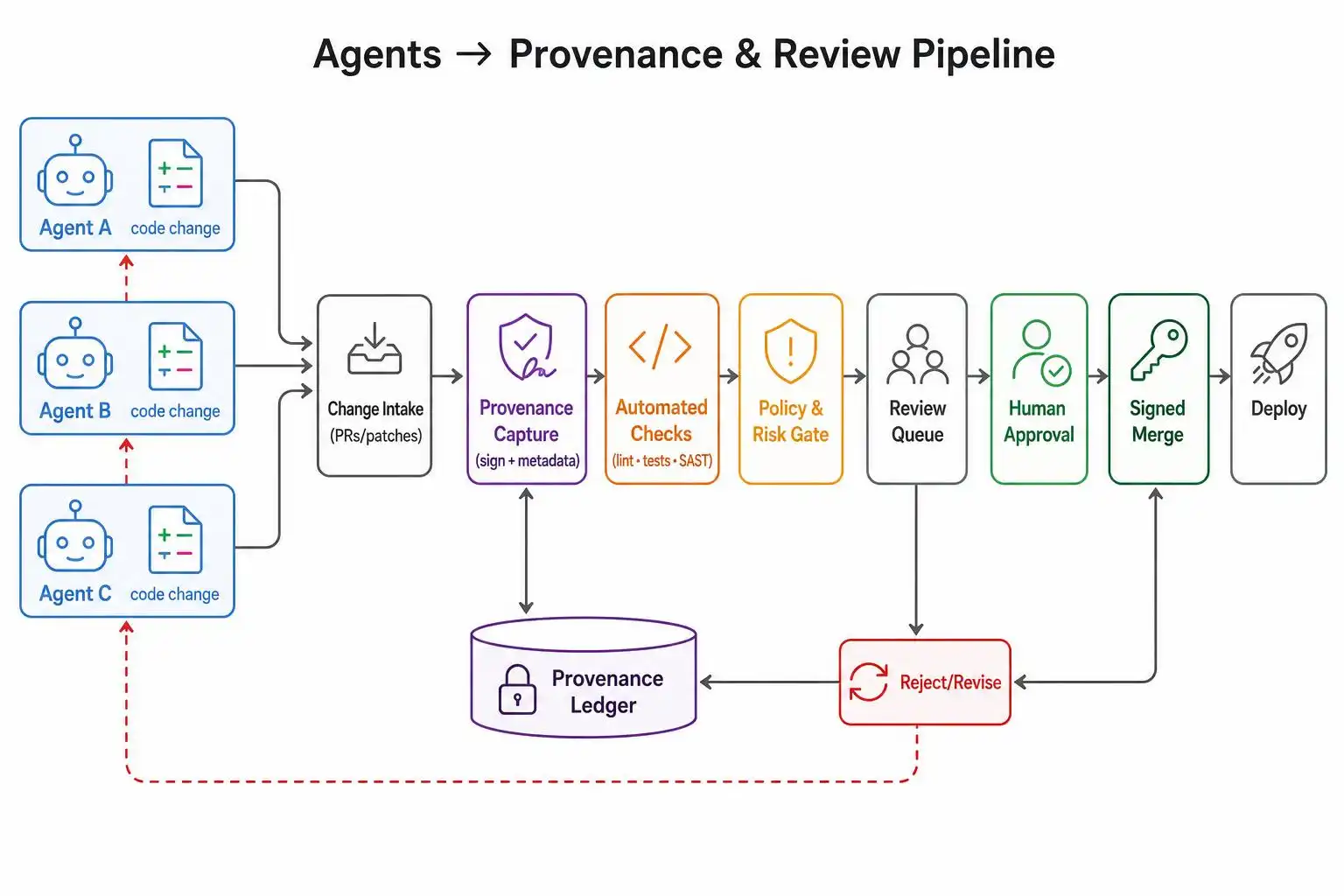
- AgentDiff: Git‑native provenance so you can see which agent wrote which line; ships list/blame/report commands and signs attribution locally — no server.[2]
- skillreaper: scans real transcripts to detect skills, MCP servers, and agents you’ve loaded but never use — then quarantines them safely.[2]
There’s also been a wave of “clean‑room” re‑implementations and terminal‑native agents (e.g., Claw Code, OpenCode, Gemini CLI, Codex CLI) that broaden your model/provider choices if you need model flexibility or privacy‑first designs.[2]
Guardrails I actually ship with agents
Whether you choose Copilot, Cursor, Claude Code, or Gemini Code Assist, bolt on these safety rails:
- Sandboxing: Cleat gives you a one‑command Docker cage so agents get full permissions inside a per‑project container but can’t touch the host. Pair with a read‑only filesystem where possible.[5]
- “Are you sure?” interlocks: Claude Code Safety Net wraps CLI agents and catches destructive Git/filesystem commands (e.g., force pushes, rm ‑rf) before they execute.[5]
- Provenance: AgentDiff to record attribution for every changed line; require an AgentDiff report artifact on PRs before merge.[2]
- Memory hygiene: Callimachus indexes agent history across tools so you can search past sessions; Claude Mnemonic handles memory/retrieval for Claude Code. Capy adds a privacy‑first virtualization layer for LLM context with MCP tool access.[5]
Minimal, practical wiring examples
Agent provenance in Git (local and CI):
# After installing AgentDiff, capture provenance on every commit.
echo "#!/usr/bin/env bash
set -euo pipefail
# Record which agent wrote what for the last commit range
agentdiff report
" > .git/hooks/post-commit
chmod +x .git/hooks/post-commit

# Ad-hoc blame when reviewing a suspicious hunk
agentdiff blame -- path/to/file.js
Multi‑agent terminal session without writing glue code:
# Launch ntm's TUI, then within it spawn panes for different agents
ntm
# Pane A: Claude Code for repo reasoning
# Pane B: Codex CLI for implementation
# Pane C: Gemini CLI for tests & research
Run agents inside a sandboxed container (replace the image per the Cleat docs):
docker run --rm -it \
  -v "$(pwd)":/workspace -w /workspace \
  --network none --read-only \
  your-cleat-image:latest \
  bash -lc 'your-agent-cli "Describe the refactor plan and apply it incrementally"'
GitHub-centric review stack with agentic suggestions and provenance:
- Use Copilot Code Review for agentic PR suggestions (it plans over the diff rather than one‑shot comments).[4]
- Require an AgentDiff report artifact on PRs and make it a branch protection check before merge.[2]
Putting it together: a sane default stack
- Local dev: Cursor in the editor for speed; Claude Code in the terminal for deep repo reasoning. Keep both behind Cleat when the repo is sensitive.[1][5]
- Reviews and compliance: Copilot Code Review for PR suggestions, AgentDiff for provenance, skillreaper to disable unused/over‑privileged skills.
[4][2] - Long‑context audits/migrations: Gemini Code Assist for the read‑everything pass, with a follow‑up implementation via Claude Code or Cursor depending on preference.[4]
- Orchestrate it: agent‑deck or ntm to keep terminals/agents orderly for multi‑step work.[2]
Key takeaways
- Pick by operating model first (editor assist, terminal reasoning, enterprise workflow, or bounded autonomy), not by hype.[1][3]
- Copilot’s edge is GitHub‑native wiring and an agentic review loop; Gemini’s edge is long context plus GCP security.[4]
- Terminal CLIs (agent‑deck, ntm, AgentDiff) make multi‑agent, model‑flexible workflows practical — and auditable.[2]
- Always ship with guardrails: sandboxing (Cleat), destructive‑command interlocks (Safety Net), provenance (AgentDiff), and memory hygiene (Callimachus/Capy/Mnemonic).[5][2]
References
- Best AI Coding Agents for Developers in 2026: Cursor, Claude Code … — https://windowsforum.com/threads/best-ai-coding-agents-for-developers-in-2026-cursor-claude-code-copilot-more.433584
- bradAGI/awesome-cli-coding-agents – GitHub — https://github.com/bradAGI/awesome-cli-coding-agents
- Best Enterprise AI Coding Agents Reviews 2026 – Gartner — https://www.gartner.com/reviews/market/enterprise-ai-coding-agents
- GitHub Copilot vs. Gemini Code Assist: Features, pricing, and how to choose — https://vercel.com/i/github-copilot-vs-gemini-code-assist
- hesreallyhim/awesome-claude-code: A hand-picked … – GitHub — https://github.com/hesreallyhim/awesome-claude-code


Leave a Reply