


We’re past the phase where “pick the smartest model” was a strategy. Benchmarks split by surface now: Claude’s Opus 4.8 tops SWE‑bench Verified, while GPT‑5.5 leads Terminal‑Bench 2.0; pricing also diverges, with several flagships at $20/month, Copilot cheaper, and Google’s IDE preview still free. Your agent choice should follow where you plan to work (editor, terminal, cloud) and how strictly you can constrain change sets. Then add brakes so the agent does the smallest thing that moves the task forward. [1]
Choose by control surface, not by brand
If you decide by where you’ll drive the work, the map simplifies: Copilot when your team already lives in GitHub and existing editors; Cursor when the IDE itself should be AI‑native; Claude Code for terminal‑first repo work; Codex when you want a repo‑aware agent that spans web, CLI, IDE, and cloud delegation; and app builders (v0, Lovable, Bolt.new) for prompt‑to‑app outcomes rather than long‑lived assist. That’s the current “control surface” guidance validated by recent tool reviews. [2]
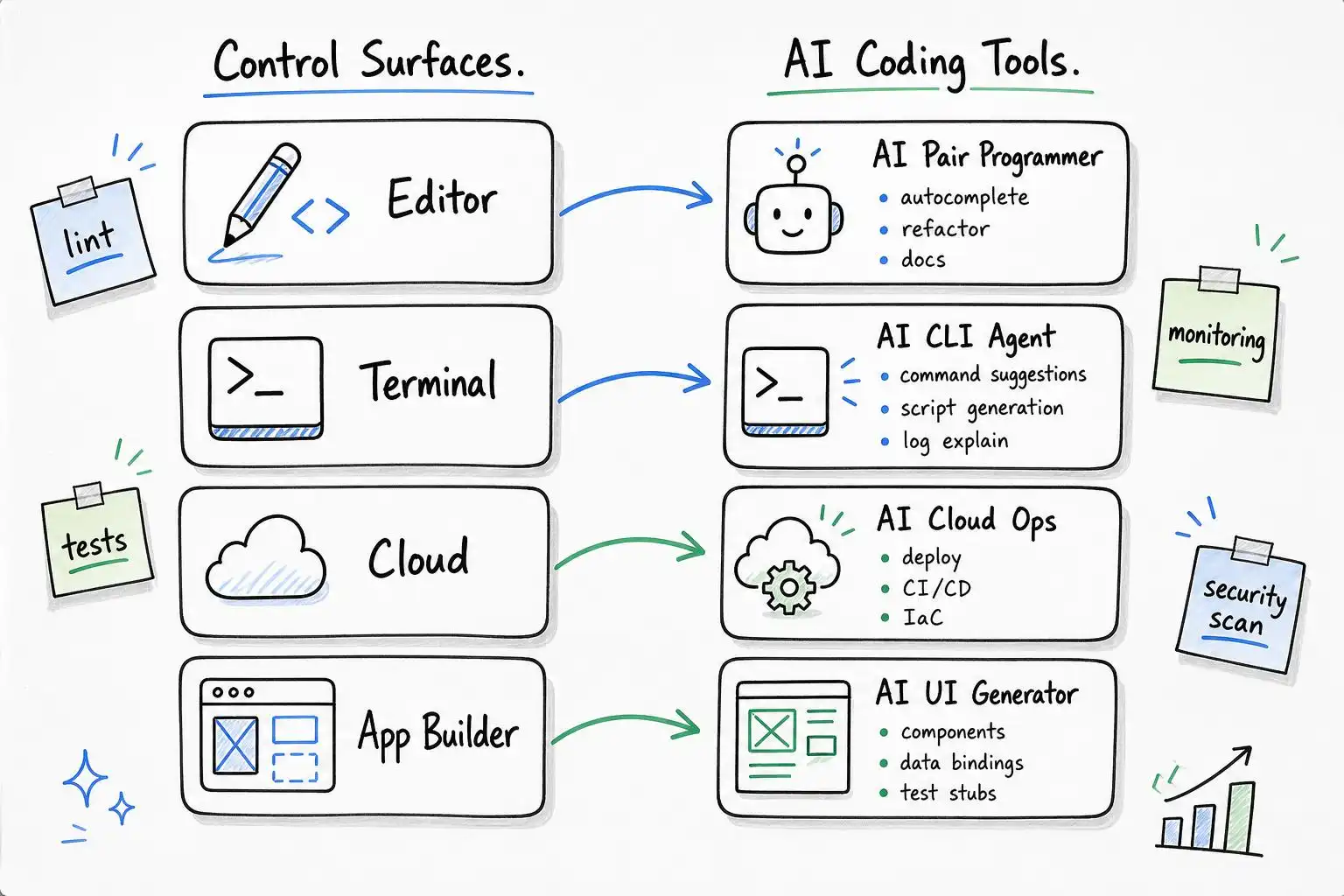
- Editor‑native: GitHub Copilot (GitHub workflow, PRs, editor autocomplete + Agent Mode) [2]
- AI‑first IDE: Cursor for fast, repo‑aware editing and code actions [2]
- Terminal/desktop agent: Claude Code for reading a whole repo, proposing cross‑file edits, and executing commands across surfaces (terminal, desktop, browser, IDE, chat) [3]
- Multi‑surface delegation: OpenAI Codex for coordinated repository tasks across web, CLI, IDE, and cloud runners [2]
- Prototype fast: Use app builders when “working app now” beats “assistant over time” [2]
What changed in June 2026: capability, price, and parallelism
Public comparisons this month show a split: Claude Opus 4.8 at 88.6% on SWE‑bench Verified and GPT‑5.5 leading Terminal‑Bench 2.0 at 82.7%. Paid tiers for Claude Code (via Pro), Codex (via ChatGPT Plus), Cursor, and Windsurf cluster at $20/month; Copilot undercuts at $10; Google Antigravity remains free in public preview and defaults to Gemini 3.5 Flash. Parallel sub‑agent execution is now a headline in Claude Code and ships natively in some open agents like OpenCode. [1]
This matters for workflow design: use parallelism for independent checks (tests, lint, doc gen), but gate write access behind an approvals step so multiple hands don’t widen a diff at once.
My split this month: where each agent actually earns its keep
Influencers will pick favorites; for example, one creator calls Codex CLI the best right now for headless runs (even from a phone), strong benchmark showings, and an inexpensive, effectively generous subscription for most workloads. If you need a battery‑friendly, SSH‑able assistant that can run unattended, that’s compelling. [5] I still divide work like this:
- Repo‑wide edits and “explain‑then‑change” loops: Claude Code, because it feels like one agent following me across terminal, desktop, browser, IDE, and chat. [3]
- Headless background chores (schema syncs, doc refresh, PR templating): Codex CLI or a Codex‑backed runner. [5][2]
- Editor‑inline nits and PR conversations: Copilot for the GitHub native fit, especially on teams that already rely on required checks. [2]
Pricing helps justify the blend: $20 tiers for Claude Code, Codex, Cursor and Windsurf; Copilot at $10 for broad team coverage; Antigravity free for individuals in preview. [1]
Add brakes: the “Ponytail” rule‑of‑least‑creation
The biggest productivity loss in 2026 isn’t model accuracy; it’s overbuilding. The “Ponytail” approach popularized on LinkedIn is a delightfully strict antidote: before writing anything, ask “Does this need to exist?” If the answer is “maybe,” it’s a no. Prefer stdlib, native platform, then already‑installed deps; only then write the minimum that works. The post shows a perfect example: ask for a date picker, get instead of a dependency fiesta. [4]
Drop this policy into AGENTS.md (or your agent’s system prompt) and make output contracts verify it:
# AGENTS.md — Minimal Change Discipline (Ponytail rules)

## Creation brakes (apply to all agents)
1) Does this need to exist? If “maybe”, do not create it.
2) Prefer stdlib > native platform features > already-installed deps.
3) If it’s one line, write one line.
4) Never skip error handling, security, or accessibility.

## Required output contract
- change_plan: bullet list of proposed edits/additions with rationale
- touch_set: exact files to be touched
- justification: for each new file, reference rules (2–3) and explain why existing options fail
- patch: unified diff only for files in touch_set
Plan → gate → apply: a minimal‑diff loop any agent can follow
You don’t need vendor‑specific commands to keep diffs tight. Use a plan/gate/apply pattern and simple scripts to block surprise file sprawl, even when you turn on parallel sub‑agents. [1]
Plan request skeleton you can send to any agent:
{
  "goal": "Add GET /health to existing FastAPI app",
  "constraints": {"allow_new_files": false, "allow_new_deps": false},
  "format": {
    "change_plan": true,
    "touch_set": true,
    "patch_format": "unified_diff"
  }
}
Gate new files in CI unless explicitly approved:
# .ci/block-new-files.sh
#!/usr/bin/env bash
set -euo pipefail
allow_new=${ALLOW_NEW_FILES:-0}
base=${BASE_REF:-origin/main}

git fetch -q
# Compare staged or PR branch against base
git diff --name-status "$base"...HEAD | awk '$1=="A"{print $2}' > .ci/new_files.txt

if [[ -s .ci/new_files.txt && "$allow_new" != "1" ]]; then
  echo "Blocked: new files proposed without approval:" >&2
  cat .ci/new_files.txt >&2
  exit 1
fi
And a Makefile‑level pattern to standardize agent runs (swap in your chosen CLI):
# Makefile
AGENT?=agent-cli   # e.g., codex, claude-code, cursor, etc.

plan:
	$(AGENT) plan --project . \
	  --goal "Add /health endpoint without new deps or files" \
	  --out .agent/plan.json

apply:
	$(AGENT) apply --from .agent/plan.json --require-patch --max-new-files 0
The trick is to make “no new files, no new deps” the default. If the agent truly needs a file, it must argue for it in the plan and you flip ALLOW_NEW_FILES=1 in that one PR.
When to turn on parallel agents (and when not to)
Parallel sub‑agents are excellent for:
- Independent analysis: run lint, tests, type checks, and doc stubs concurrently, each producing diffs queued behind your gate. [1]
- Exploratory drafts: generate two alternative minimal patches, then pick the smaller one.
Use a single writer for the final patch. Parallel writers tend to broaden the touch set and trip your gate.
Cost and surface reminders you can quote to stakeholders
- Capability split: Claude leads SWE‑bench Verified; GPT‑5.5 leads Terminal‑Bench 2.0. [1]
- Prices: Claude Code, Codex, Cursor, Windsurf start at $20/month; Copilot $10; Antigravity free in preview with Gemini 3.5 Flash default. [1]
- Fit by surface: Copilot (GitHub/editor), Cursor (AI‑first IDE), Claude Code (terminal/repo ops), Codex (multi‑surface delegation), app builders for prompt‑to‑app. [2]
- Claude Code behaves like a workflow‑native agent across terminal, desktop, browser, IDE, and chat. [3]
- A credible case for Codex CLI as a headless, mobile‑triggerable pick for many: strong speed/price and benchmark claims in the wild. Validate against your stack. [5]
Key takeaways
- Choose agents by control surface first; don’t overfit to a single benchmark. [2][1]
- Bake in “Ponytail” minimalism: no new files or deps by default, justify exceptions in a plan. [4]
- Use parallel agents for analysis, not simultaneous writes; gate all patches. [1]
- Blend tools pragmatically: Claude Code for repo‑wide workflows, Codex for headless/background, Copilot for GitHub‑native ergonomics. [3][2][5]
References
- 12 AI Coding Agents Compared in 2026: Claude Code vs Antigravity … — https://ssojet.com/blog/ai-coding-agents-compared
- Best AI Coding Tools: Copilot, Cursor, Claude Code, Codex, and App Builders | YixScout — https://ai.pdzsup.com/resources/columns/best-ai-coding-tools
- The Best AI Coding Assistants: 20 Tools Reviewed for 2026 – Axify — https://axify.io/blog/the-best-ai-coding-assistants-a-full-comparison-of-20-tools
- Ponytail: Efficient AI Coding with Claude, Cursor, and GitHub Copilot | Jaideep Valani posted on the topic | LinkedIn — https://www.linkedin.com/posts/jaideep-valani-6609669_github-dietrichgebertponytail-makes-your-activity-7475395589854253056-4xfQ
- Which coding agent should you actually use in 2026? I’m going with … — https://www.instagram.com/reel/DaAghGIQL7C


Leave a Reply