
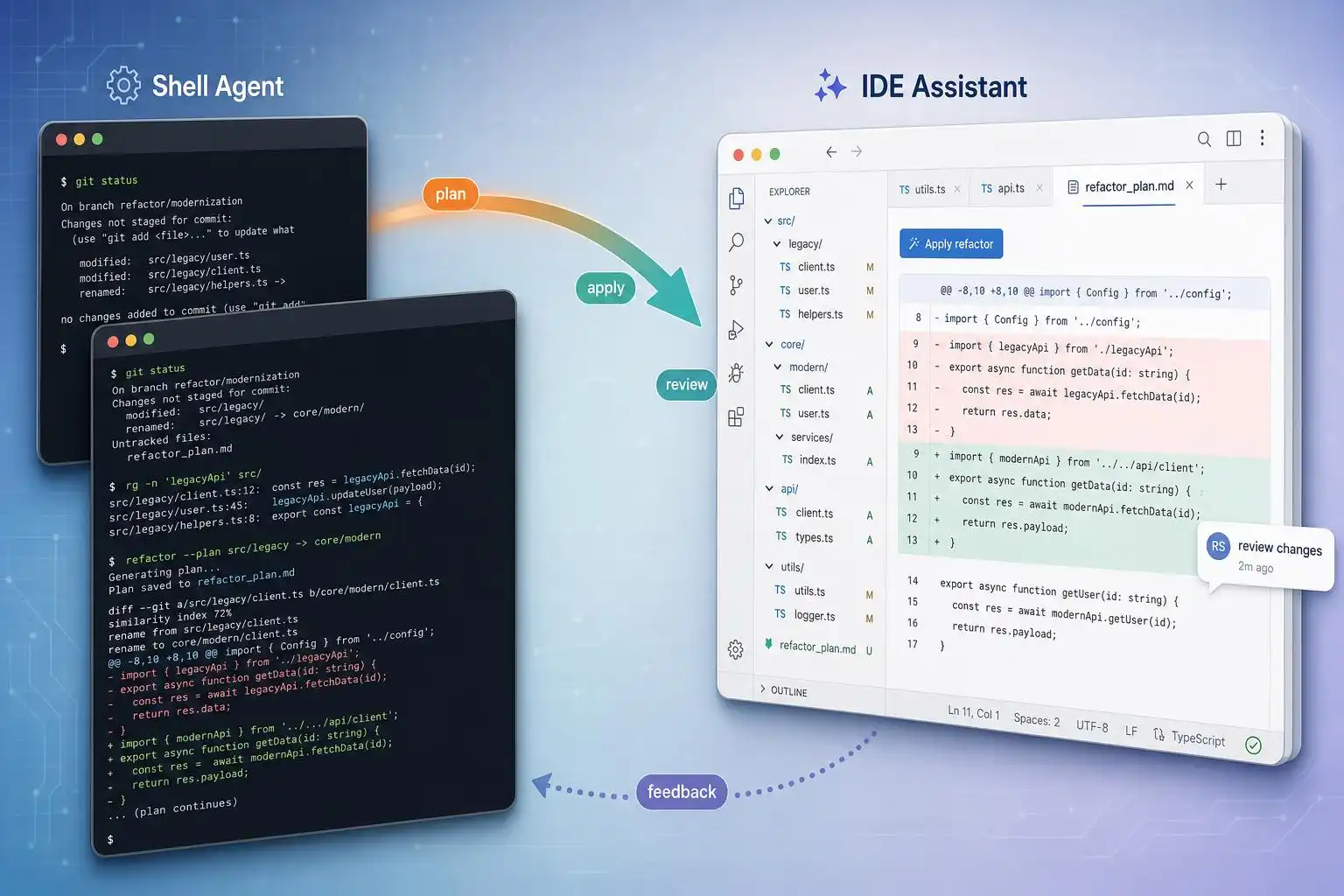

Last week I migrated a brittle logging layer across a 40k‑line service. The winning move wasn’t a single “smart” agent — it was splitting the job: a terminal‑native agent to bulldoze the multi‑file refactor overnight, then an IDE‑native assistant to sand down the edges in the morning. If you’ve been trying to force one tool to cover every task, 2026’s ecosystem rewards a divide‑and‑conquer approach.
Here’s a practical guide to choosing the right driver per task, wiring them together, and avoiding surprise bills — anchored to what the latest comparisons and reviews are actually finding [1] [2] [3] [4] [5].
Two modes, two strengths
- Terminal‑native agents (e.g., Claude Code, OpenAI Codex CLI, Aider) run as independent processes in your shell. They watch your repo, edit files, run commands/tests, and report via a TUI. They excel at long, cross‑file refactors and automation where spawning subprocesses and live test execution are key [1].
- IDE‑native agents (e.g., Cursor, GitHub Copilot Workspace, Continue.dev) live in your editor, offering inline suggestions, diffs, and context‑aware completions. They shine for immediate, function‑level work with minimal context switching [1].
If you map tasks to modes first, tool choices get simpler.
The 2026 snapshot: performance, adoption, and constraints
- Benchmarks and fit: GPT‑5.5 currently tops industry tests (~94.6% success), Claude Code is favored for complex refactors, Cursor dominates as a daily IDE driver, Devin 2.5 handles async delegation, and Continue.dev/Aider win for self‑hosted or tight budgets [1].
- Real‑world adoption: GitHub Copilot has 1.8M+ paid subscribers with ~55% acceptance in Python in one roundup; Cursor raised a large Series A and is widely used for deep code understanding; Claude Code is positioned as CLI‑first for hard refactors [2]. Another review notes Cursor has surpassed 40M users, Claude Code crossed 1M shortly after GA in 2025, and 73% of engineering teams now use some AI coding assistance [4].
- Capacity and pricing (examples): Claude Code advertises large context (around 500k tokens) with Opus‑tier pricing per‑million tokens; Cursor can route up to ~1M tokens context with flat or pass‑through pricing; GitHub Copilot Workspace (distinct from inline Copilot) is $39/user/month for enterprise PR‑centric flows; OpenAI Codex CLI can reach ~1.05M tokens (GPT‑5.5) on a per‑million token model [1].
- Sandboxed vs free‑roam: Codex CLI runs inside a sandboxed execution context — great for shared machines, CI‑adjacent tasks, or sensitive repos, but more constrained than free‑roam terminal agents like Claude Code or Aider [4].
If you’re still torn, one decision hub suggests jumping straight to Cursor vs Claude Code when you’re weighing a polished AI‑native editor against a more autonomous, terminal‑centered workflow [3].
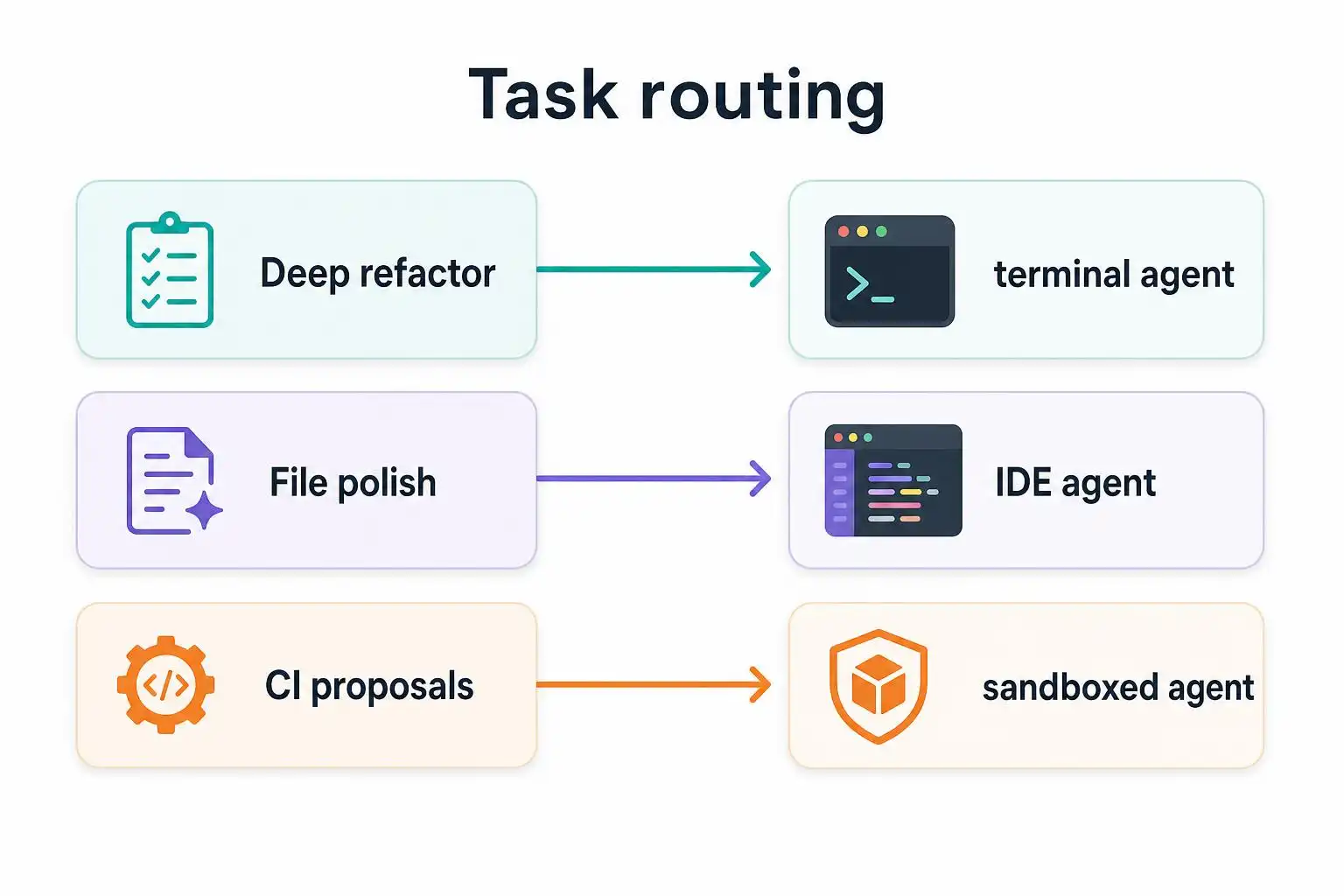
Decision quickstart: route by task
- Deep, multi‑file refactor or architecture migration: Terminal‑native agent (Claude Code or Aider). Want containment? Use Codex CLI’s sandbox, especially in CI [1] [4].
- PR‑centric team flow with design docs and reviews: GitHub Copilot Workspace for GitHub‑native teams [1].
- Day‑to‑day coding inside the editor: Cursor or inline Copilot for speed and fewer context switches [1] [2].
- Asynchronous task queues or overnight runs: A more autonomous agent (e.g., Claude Code’s workflow features) [1] [4].
My split‑stack playbook (with concrete scaffolding)
1) Isolate the big change safely
Create a throwaway worktree and a safety harness so your terminal agent can work freely while tests run continuously.
# Create an isolated worktree for the refactor
BR=chore/refactor-logging
mkdir -p .worktrees && git worktree add .worktrees/$BR -b $BR
cd .worktrees/$BR

# Start a fast feedback loop in another pane
# This re-runs tests on any file change
ls -1 **/*.py | entr -r pytest -q
This mirrors how terminal‑native agents thrive with live test execution and repo‑wide edits [1].
2) Drive the heavy refactor in the terminal
Use your terminal‑native agent to propose and apply multi‑file changes. Keep scope sharp and articulate pass/fail gates (tests, linters):
Goal: Replace custom logger with stdlib logging across repo.
Constraints: Preserve log levels, do not change message text, keep public API.
Validation: pytest -q must pass; mypy strict on /src passes.
Output policy: Batch patches <= 200 lines; pause after each batch for review.
If you need containment (shared hosts, CI‑adjacent), prefer a sandboxed agent run so the system boundary is explicit [4].
3) Let the IDE agent finish the job
Once the big cuts compile, switch to your editor and hand the IDE‑native agent a tight, file‑level brief:
Context: The logging migration is complete but a few call sites still expect the old signature.
Task: Update only this file to use logging.getLogger(__name__), keep message text identical.
Extra: Add a TODO where behavior changes are ambiguous; do not create new modules.
This is where Cursor/Copilot‑style inline edits feel instantaneous and low‑friction [1].
4) Put a soft cost ceiling on long runs
Per‑million token pricing makes budgeting fuzzy. Do a back‑of‑the‑envelope before you kick off an overnight run using the published ballparks [1]:
# Rough token cost estimator
# Edit the numbers based on your agent's current rate card
INPUT_TOKENS   = 350_000   # tokens you expect to stuff in
OUTPUT_TOKENS  = 180_000   # tokens you expect back
IN_RATE_PER_M  = 5.00      # $ per 1M input tokens (example: Claude Opus tier)
OUT_RATE_PER_M = 25.00     # $ per 1M output tokens

cost = (INPUT_TOKENS/1e6)*IN_RATE_PER_M + (OUTPUT_TOKENS/1e6)*OUT_RATE_PER_M
print(f"Estimated cost: ${cost:.2f}")
Set a watchdog to stop the session if it exceeds your estimate by, say, 30%.
5) Wire an agent into CI the safe way
When you want an agent to propose code in CI, keep its powers narrow. A sandboxed CLI helps here [4]:
# .github/workflows/agent-proposal.yml
name: Agent proposals
on: pull_request
jobs:
  propose_fixes:
    runs-on: ubuntu-latest
    permissions:
      contents: write   # allow PR comments/commits from a bot account
    steps:
      - uses: actions/checkout@v4
      - name: Run tests (baseline)
        run: pytest -q || true
      - name: Generate agent patch (sandboxed)
        run: |
          # Replace with your agent CLI invocation
          # Ensure it only reads the repo and writes to a ./patches folder
          agent-cli --goal "fix flaky test in tests/test_api.py" \
                    --readonly-root "$GITHUB_WORKSPACE" \
                    --output ./patches
      - name: Apply patch and push to PR
        run: |
          git config user.name  "agent-bot"
          git config user.email "agent-bot@example.com"
          git apply ./patches/*.patch
          git commit -am "Agent proposal: stabilize test"
          git push
6) Automate recurring refactors
Claude Code’s recent releases introduced “dynamic workflows” that can trigger automation on file or git events, promoting it from an interactive helper to light‑weight workflow infrastructure — handy for nightly dependency bumps or codemod sweeps [4]. Treat these like you would any CI job: immutable inputs, observable outputs, and clear stop conditions.
When to switch agents mid‑task
- The refactor’s 80% done but you’re fighting type errors: switch to IDE‑native for tight, file‑scoped fixes.
- The editor chat keeps losing context or thrashing: promote it to a terminal‑native session with repo‑wide context and tests.
- You’re in a regulated environment: prefer enterprise plans and keep sensitive code in privacy‑scoped deployments; avoid pasting secrets into public endpoints [5].
A note on expectations and team norms
Across reports, the pattern holds: these tools boost throughput when you right‑size the task to the agent — Copilot for speed inside the file, Cursor for deeper in‑editor understanding, Claude Code for complex refactors, and sandboxed Codex CLI for contained automation [1] [2] [4]. Treat AI output like a junior developer’s draft: review, test, and secure before merging; mix tools intentionally; and revisit configs monthly — capabilities are shifting fast [5].
Key takeaways
- Pick the mode first: terminal‑native for repo‑wide changes and automation; IDE‑native for tight, in‑file edits [1].
- Use sandboxed CLIs when you need containment (shared machines/CI); use free‑roam agents for power refactors [4].
- Budget up front: large contexts are powerful but can be pricey; set soft cost ceilings for overnight runs [1].
- Don’t force a single agent to do everything; switch mid‑task when the scope changes [1] [3].
- Establish team norms: review AI output like a junior’s PR, and keep sensitive code in compliant deployments [5].
References
- [1] 7 Best AI Coding Agents in 2026: Features & Pricing — https://chatgptaihub.com/7-best-ai-coding-agents-for-writing-compared-features-pricing-use-cases
- [2] Cursor vs Copilot vs Claude Code vs Codex (2026) — YouTube — https://www.youtube.com/watch?v=ha5qhDjApyI
- [3] AI Coding Assistant Comparisons 2026: Best Code Tools Compared | RankVipAI — https://rankvipai.com/ai-tool-comparisons/ai-coding-assistant-comparisons
- [4] Best AI Coding Tools in 2026: Claude Code, Cursor, Copilot … — Blink — https://blink.new/blog/best-ai-coding-tools-2026
- [5] Best AI Tools for Developers in 2026: What Are Your Must-Have … — GitHub Discussions — https://github.com/orgs/community/discussions/187143

Leave a Reply