
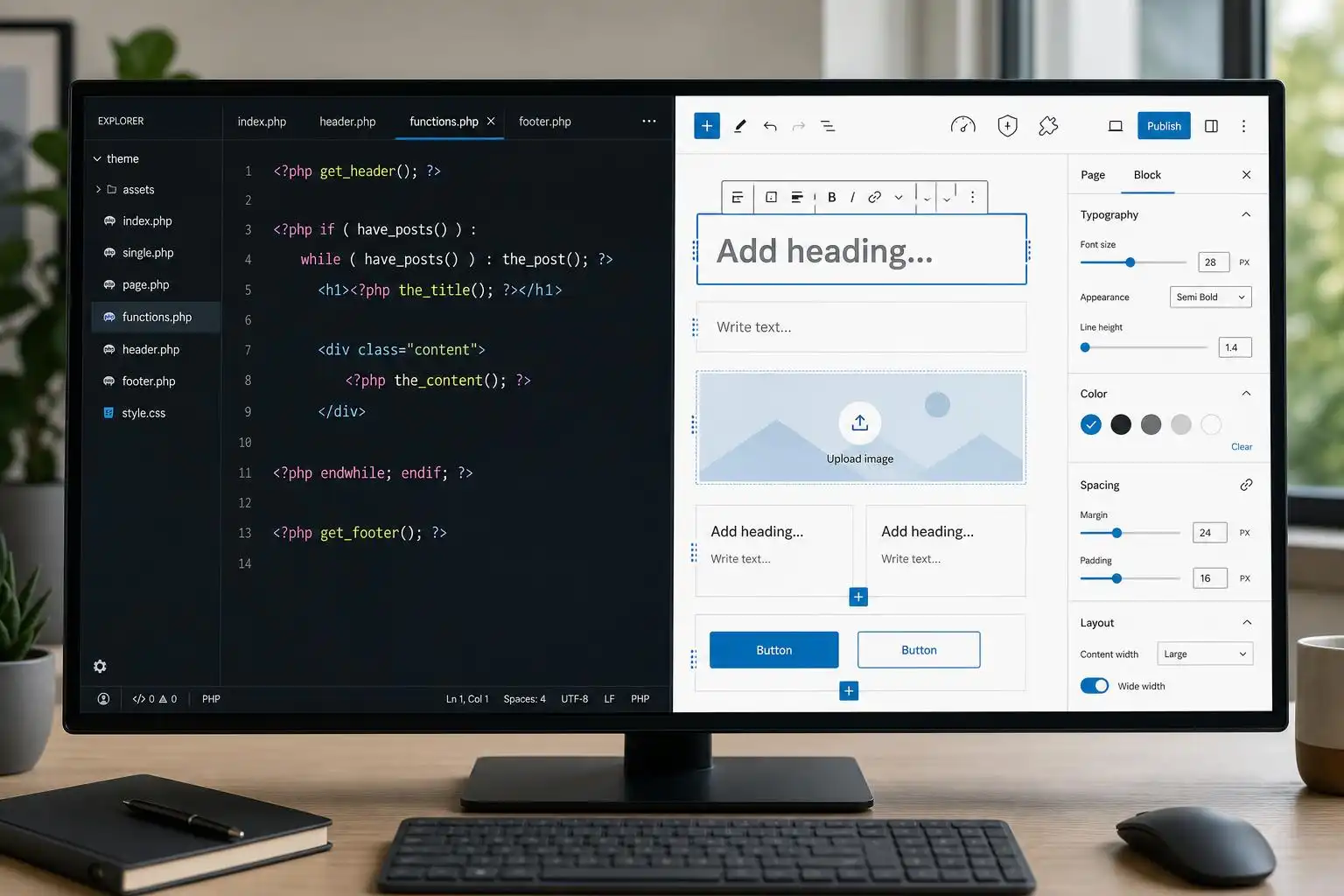

The current WordPress theme conversation is no longer a clean split between “classic themes” and “block themes.” The more interesting middle ground is the hybrid theme: a classic PHP theme that selectively adopts block-era features like theme.json, block templates, block patterns, editor styles, and Site Editor-adjacent workflows.
That matters because many production WordPress sites are not greenfield playgrounds. They are WooCommerce shops, course platforms, brochure sites with years of custom fields, and agency builds with client-specific admin workflows. A recent Kinsta deep dive frames hybrid themes as a practical user-and-developer approach rather than a compromise, and I think that’s the right lens: hybrid themes let us modernize without throwing away stable classic-theme architecture [4].
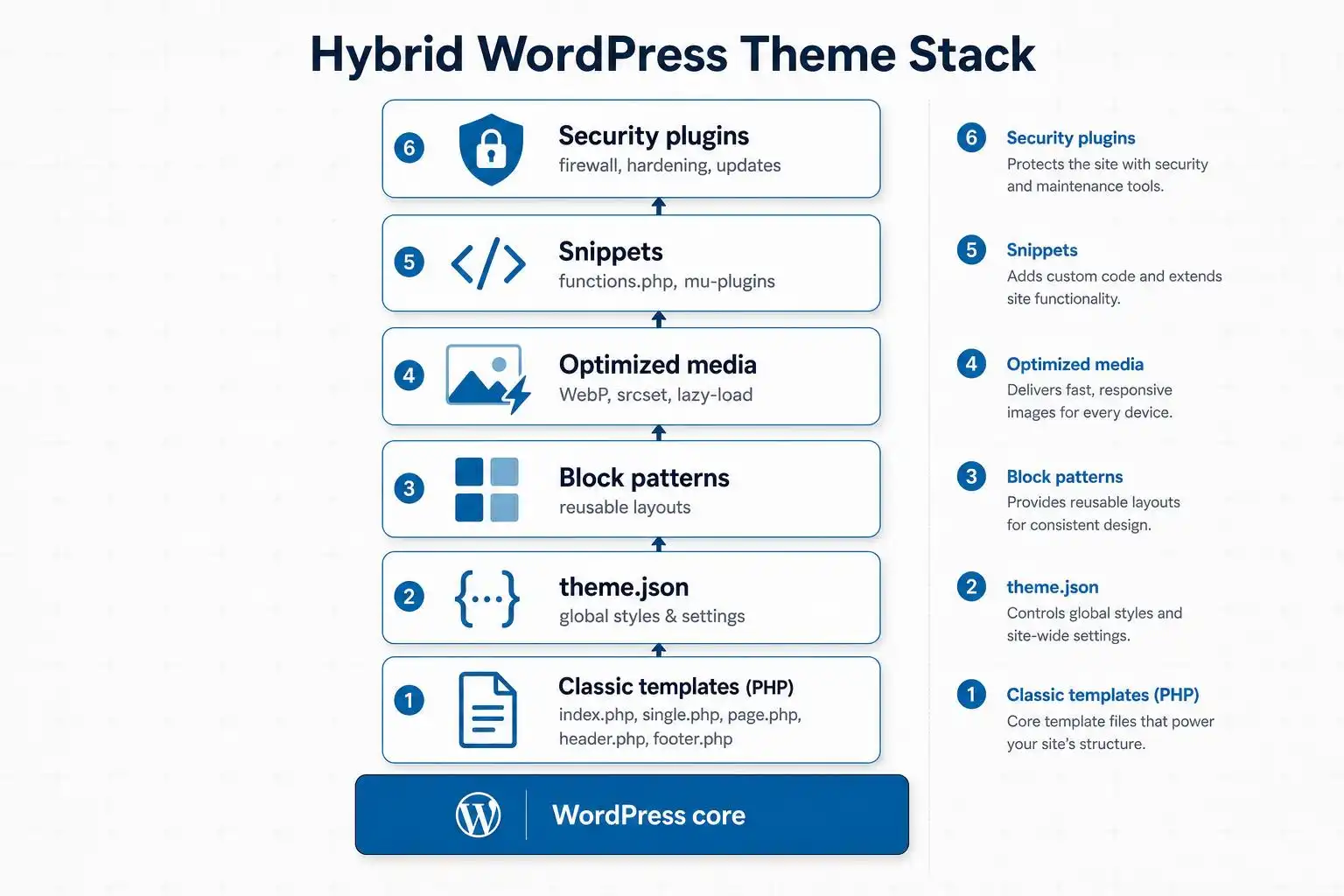
Why hybrid themes are showing up in real builds
As a developer, I like full block themes when the project is ready for them. But “ready” is doing a lot of work there. A full block theme changes how templates are edited, where layout decisions live, and how much control clients have over global design. That can be excellent — or it can be a support ticket factory.
Hybrid themes give us a safer migration path. You can keep familiar PHP templates, hooks, and plugin compatibility while selectively adding block features where they make sense. For example:
- Add a `theme.json` file to standardize spacing, color palettes, typography, and block defaults.
- Register block patterns for repeatable landing-page sections.
- Use block-based content areas while keeping custom PHP templates for complex views.
- Gradually move client-editable sections into blocks without rebuilding the entire theme.
That is especially useful for sites already built on fast classic-style foundations. Astra remains one of the most visible examples in the directory, marketed as lightweight and highly customizable with a very large install base and thousands of five-star reviews [2]. Whether you use Astra itself or a custom starter theme, the broader point is the same: performance-focused classic architecture still has a place, and hybrid techniques let it participate in modern WordPress.
The plugin stack is part of the hybrid story
A hybrid theme is not only a theme decision. It affects the way you choose plugins.
Take WPCode, for example. Its directory listing emphasizes inserting header/footer scripts and managing custom code snippets for analytics, CSS, tracking pixels, and similar site-level additions [1]. On a hybrid build, I would still be careful not to turn a snippets plugin into a dumping ground for business logic. But for small, auditable integrations — analytics, verification tags, a temporary CSS override — it can be cleaner than asking a client to edit theme files.
Image handling is another practical layer. Converter for Media focuses on serving WebP and AVIF alternatives for JPEG, PNG, and GIF files [3]. That pairs naturally with hybrid themes because performance wins are not limited to template architecture. You can have a beautifully structured block pattern library and still ship a slow site if every hero section loads a huge unoptimized image.
Security also belongs in this conversation. Kadence Security, formerly iThemes Security, positions itself around login security, two-factor authentication, brute-force protection, vulnerability scanning, and firewall features [8]. When I inherit older classic sites and begin modernizing them, security hardening is often step one. There is no point polishing the Site Editor experience if the admin area is still protected by weak passwords and no 2FA.
Where page builders fit now
The page builder market is still very much alive. WPBeginner’s 2026 comparison highlights established drag-and-drop tools such as SeedProd, Beaver Builder, and Thrive Architect for quickly launching landing pages and client-facing layouts [7].
I do not read that as “blocks lost.” I read it as proof that WordPress sites live on a spectrum:
- Full block themes for projects that want maximum Site Editor control.
- Hybrid themes for teams modernizing classic builds or managing more structured client sites.
- Page builders for marketing teams that prioritize rapid visual layout creation.
The mistake is treating those as moral categories. They are implementation choices. For a campaign microsite, a page builder may be the fastest responsible option. For a publication with strict editorial design rules, a hybrid theme with curated patterns may be better. For a new block-native product site, a full block theme may be ideal.
My practical hybrid-theme checklist
When I’m deciding whether to modernize a classic theme into a hybrid theme, I usually start with five questions.
1. Does the client need template editing, or just content editing?
If the client only needs to edit page content, block patterns inside a classic template may be enough. If they need to rearrange headers, footers, archive templates, and global layout pieces, a full block theme becomes more attractive.
2. Can design tokens be centralized?
This is where theme.json shines. Even in a classic theme, defining editor palettes, font sizes, spacing presets, and block defaults can prevent design drift. It also makes the editor feel less like a blank canvas and more like a controlled design system.
3. Are custom templates still doing important work?
If the site relies on custom post types, advanced queries, membership logic, LMS templates, or WooCommerce overrides, I am cautious about going fully block-native too quickly. Hybrid lets me keep PHP where PHP is still the clearer tool.
4. Are performance decisions being made at every layer?
A fast theme helps, but it is not enough. Evaluate fonts, image formats, third-party scripts, block CSS, caching, and how much JavaScript your plugins add. This is why tools in the ecosystem around lightweight themes and image conversion matter [2] [3].
5. Is there a maintenance plan?
Hybrid themes can become messy if the team keeps adding one-off snippets, plugin overrides, and custom blocks without documentation. I like to document which features live in the theme, which live in a functionality plugin, and which are safe to manage through a snippets tool like WPCode [1].
A small example: adding block support without going all-in
A classic theme can start adopting modern editor behavior with a few targeted changes. For instance, in functions.php or a theme setup file:
add_action( 'after_setup_theme', function () {
    add_theme_support( 'editor-styles' );
    add_editor_style( 'assets/css/editor.css' );

    add_theme_support( 'wp-block-styles' );
    add_theme_support( 'responsive-embeds' );
} );
Then add a theme.json file to define the design rules WordPress should expose in the editor:
{
  "version": 2,
  "settings": {
    "color": {
      "palette": [
        { "slug": "brand", "color": "#2454ff", "name": "Brand" },
        { "slug": "ink", "color": "#111827", "name": "Ink" }
      ]
    },
    "spacing": {
      "units": [ "px", "rem", "%" ]
    }
  }
}
That does not make the theme a full block theme. It simply gives editors a more consistent writing and layout environment. In many client projects, that is exactly the right first step.
The bottom line
Hybrid themes are not a retreat from the block editor. They are one of the most realistic ways to bring the block editor into the kinds of WordPress sites people already run.
If you are starting fresh and the requirements are straightforward, a full block theme may be the cleanest path. But if you are maintaining an established site, supporting a client workflow, or modernizing a classic build in phases, the hybrid approach deserves serious consideration. Pair it with a lean theme foundation, disciplined snippet management, modern image delivery, and basic security hardening, and you get a WordPress stack that feels current without being reckless.
References
- WPCode – Insert Headers and Footers + Custom Code Snippets – WordPress Code Manager
- Astra
- Converter for Media – Optimize images | Convert WebP & AVIF
- WordPress Hybrid Themes: A user and developer approach
- 15 Best Drag & Drop WordPress Page Builders in 2026 Compared
- Kadence Security – Password, Two Factor Authentication, and Brute Force Protection

Leave a Reply
You must be logged in to post a comment.